


Principal®
4.72.32K Reviews
App Specs
- Version
- 4.0.146
- Updated On
- License
- Free
- Downloads
- 1,000,000+
- Developer
- Principal Financial Group, Inc.
- Categories
- Finance
- Platform
- Android, iOS
Screenshots
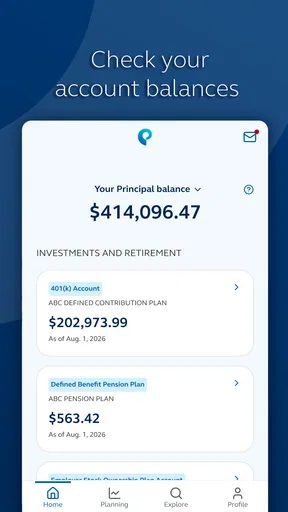
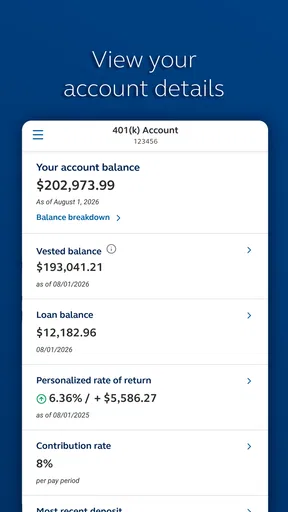
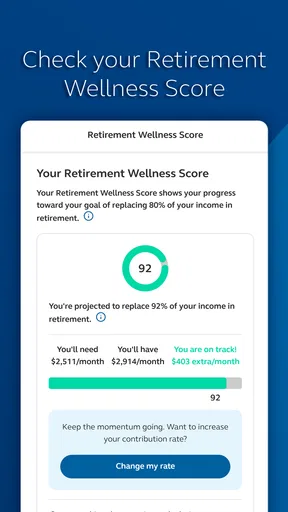
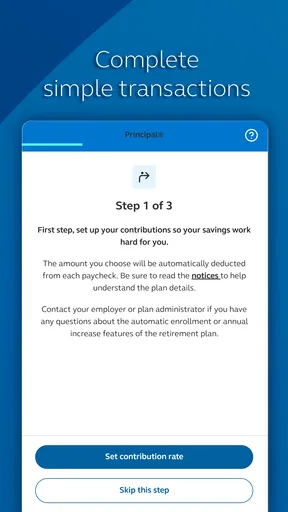
 Analysis by AppCompare
Managing money from a phone sounds simple until an app tries to cover too much at once. After spending time with Principal®, my view is that it works best as a focused companion for people already connected to Principal Financial Group, Inc., rather than as a universal replacement for every finance tool. Its main value is convenience: it puts financial-goal tracking and account-related tasks in one mobile place, so I can check in without opening a desktop browser.
That focus matters. Principal® is a free finance app for everyone, and its purpose is easy to understand: help me keep up with my financial goals while I am away from a computer. It is not trying to be a budgeting game, a general spending tracker, or a broad comparison marketplace. If I want a straightforward mobile connection to Principal services, the app feels relevant. If I want one dashboard for every bank, card, bill, and investment provider I use, I would look elsewhere.
What using Principal® feels like in everyday life
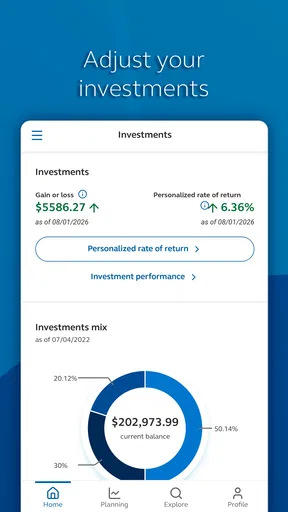
The first thing I noticed is that the app makes more sense when I treat it as part of an ongoing routine rather than something I open only during a financial emergency. A quick check can help me stay aware of progress toward a goal, review what needs attention, and avoid letting a long-term plan disappear into the background. That is a modest benefit, but it is often the practical difference between having a financial intention and remembering to act on it.
A realistic example would be checking the app on a weekday morning before making a larger purchase. I might look at my current financial picture, remind myself what I am working toward, and decide whether the purchase fits the plan. The app does not need to turn that moment into a complicated budgeting session. Its usefulness comes from reducing the distance between a goal and the next small decision.
Principal® is also better suited to periodic check-ins than constant transaction-by-transaction micromanagement. I would use a dedicated budgeting app for detailed categories, recurring bills, spending limits, and household expense analysis. Here, I see the stronger role as keeping Principal-related financial goals visible and accessible. That distinction helps set realistic expectations before downloading it.
The app comes from Principal Financial Group, Inc., which gives it a clear connection to the company’s own financial ecosystem. That can be an advantage for existing customers because a company-specific app usually feels more direct than trying to reconstruct the same information through a third-party service. It can also be a limitation for someone who has no relationship with Principal, since the experience is unlikely to replace a general-purpose finance hub.
A useful mobile companion for long-term attention
Financial goals are easy to postpone because they often depend on repeated choices rather than one dramatic action. A mobile app can help by making those goals part of ordinary phone use. In my experience, the strongest reason to keep Principal® installed is not novelty; it is the low effort involved in checking progress when I already have a few minutes available.
Worth Reading Before You Choose

EA SPORTS FC Mobile 26 Is a Bigger Football Game, but It Takes Time

Flipboard Shows What News Apps Must Do Beyond the Feed

Switching to Android Auto Means Rethinking Your Driving Routine

Google Calendar Makes a Crowded Week Easier to Manage

Ludo King Makes the Most of the Minutes Between Plans

Baby Panda World Brings Quick Play to Modern Phones, but Its Game Library Feels Busy
I would especially value that during transitional periods: changing jobs, reviewing retirement preparation, or trying to make a long-term plan feel more concrete. The app can serve as a reminder that these goals are active rather than theoretical. That does not remove the need to understand the underlying products or make careful decisions, but it can make follow-through easier.
One practical habit is to choose a regular review moment instead of opening the app randomly. For example, I could check it after a monthly bill review, then write down one question or action that deserves deeper attention. This keeps the phone experience from becoming passive scrolling. It also prevents a common mistake: confusing seeing an account screen with actually reviewing whether a plan still fits.
Another useful approach is to use the app as a starting point, not the entire decision process. If a balance or goal status prompts concern, I would take time to investigate the reason rather than reacting immediately. Mobile screens are convenient, but they are not always the best place for complex comparisons. Principal® is strongest when it helps me notice what deserves attention and then decide what to do next.
Where it compares well with familiar alternatives
Compared with a desktop website, a dedicated mobile app is naturally more convenient for quick checks. I do not need to wait until I am at a laptop to reconnect with a financial goal. That matters for people who prefer short, frequent reviews instead of occasional long sessions. The app’s free price also removes a separate subscription decision, which makes trying it less risky for an eligible user.
Compared with a general budgeting application, however, the trade-off is specialization. General finance apps often appeal to people who want a combined view of spending, cash flow, debts, and accounts from multiple institutions. Principal® has a narrower identity. I would choose it for direct access to Principal-related financial information and goals, not because I expect it to replace a complete household budget.
It also differs from a spreadsheet. A spreadsheet can be customized almost endlessly, but it demands manual upkeep and discipline. Principal® offers a more immediate mobile experience for its intended financial relationship. On the other hand, a spreadsheet may remain better for someone who wants to model several scenarios, compare assumptions, or build a detailed plan independently.
The comparison with a bank app is equally important. A bank application is usually centered on everyday cash management, while this app is more naturally associated with broader financial goals. Someone looking mainly to move money, monitor daily purchases, or manage a checking account may find a banking app more suitable. Someone trying to keep a longer-term Principal plan in view may appreciate the different emphasis here.
Three habits that make the app more useful
First, separate monitoring from decision-making. I would use Principal® to see what has changed or what needs attention, then avoid making a major financial choice solely because a mobile screen gave me a quick impression. This is particularly important when a goal involves a long time horizon. The app can improve awareness, but awareness still needs context.
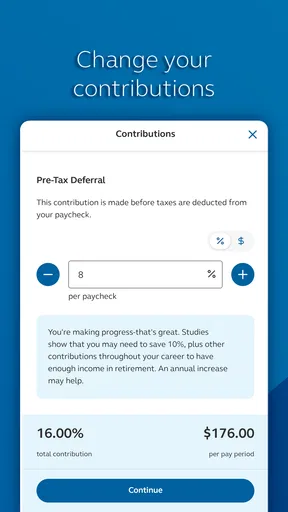
Second, connect each visit to one action. After checking progress, I might confirm a contribution, review a goal, or make a note to ask a more detailed question. This turns the app from a passive information display into part of a repeatable routine. It is a small workflow, but it makes a difference because financial apps are easy to open without changing anything.
Third, keep a separate place for the wider household picture. If my finances involve several providers, I would not assume Principal® alone gives me a complete overview. I would pair it with a budget, a spreadsheet, or another appropriate tool for expenses and obligations outside Principal. That combination is more realistic than forcing one specialized app to do every job.
The friction I would want users to understand
The biggest weakness is the app’s limited usefulness outside its intended relationship. A person looking for a universal finance dashboard may download it expecting broad account aggregation or detailed spending analysis and come away disappointed. The app’s focused design is a strength for the right user, but it narrows the audience.
There is also a psychological limitation to mobile financial tracking: convenience can encourage shallow check-ins. Seeing a goal on a screen may feel productive even when no decision follows. I would not blame the app for that entirely, but it is worth recognizing. A good routine should include occasional deeper reviews, especially when income, priorities, or time horizons change.
Another trade-off is screen size. Short reviews are comfortable on a phone, while complicated financial questions are not. If I need to compare several possibilities or understand a significant change, I would prefer a larger display and more time. Principal® is convenient for access and awareness; it is not automatically the best environment for every financial conversation.
Users should also think about their own comfort with mobile account access. A finance app is most helpful when I am willing to use it consistently and protect access to my device. Someone who rarely checks financial information digitally may gain little from installing another app. In that case, a browser or direct human support may fit their habits better.
Who should install it, and who should skip it
I would recommend Principal® to an existing Principal customer who wants a simple way to stay connected to financial goals while traveling, commuting, or handling a busy schedule. It is also a sensible choice for someone who prefers short mobile check-ins and does not want to depend entirely on a desktop session. The free cost makes experimentation straightforward, and the Everyone age rating means it is presented for a broad audience.
I would be more cautious about recommending it to a person who wants detailed expense categorization, a complete multi-provider dashboard, or a replacement for a full financial-planning process. That user may be happier with a general budgeting tool, a spreadsheet, or a combination of services. The right choice depends less on the app’s popularity than on whether its Principal-centered focus matches the user’s actual needs.
The public response suggests that many people find value in it: Principal® holds a 4.7 average from around 44 thousand ratings, with over 1 million installs and roughly 2.3 thousand written reviews. Those figures indicate strong adoption and generally positive reception, but they should not override personal fit. A highly rated specialized app can still be the wrong download for someone seeking everyday banking or broad financial aggregation.
Version, access, and the practical download decision
The app was released on March 1, 2019, and the current version is 4.0.146. That history gives it the profile of an established mobile product rather than a brand-new experiment. I would still keep the app updated through the normal store process, particularly for a finance application where access and reliability matter more than flashy extras.
Because it is free, the main question is not whether the download fee is worthwhile. The real question is whether I have a Principal-related reason to use it. If I do, the app can provide a convenient daily or weekly touchpoint. If I do not, installing it simply because it is well rated is unlikely to create much value.
I would also decide in advance what I expect from the app. If my goal is “check my progress and stay engaged,” it appears well matched. If my goal is “replace my budget, bank app, investment research, and financial adviser,” that expectation is too broad. Clear expectations prevent the most common disappointment with specialized finance software.
My final assessment
My overall impression is positive but deliberately specific: Principal® is a useful mobile companion for keeping Principal-related financial goals within reach, not a universal command center for personal money management. Its strongest quality is the way it can turn occasional financial awareness into a more convenient habit. Its main weakness is the same focus that gives it purpose.
I would recommend it to Principal users who want quick access and a regular reminder to stay engaged with longer-term plans. I would pair it with a separate budgeting method if I needed detailed household analysis. For someone outside the Principal ecosystem, I would choose a broader finance app instead. The best reason to install Principal® is not that it does everything, but that it can make one important part of financial management easier to revisit.
Pros
- Simple interface makes daily planning quick to understand.
- Useful reminders help keep important tasks visible.
- Works well for organizing personal routines and priorities.
- Clean design keeps the experience focused and distraction-free.
- Suitable for users who prefer straightforward productivity tools.
Cons
- Some advanced features may require a paid subscription.
- Customization options can feel limited for power users.
- Notifications may become repetitive with frequent reminders.
- The app may lack deeper collaboration features for teams.
- Performance can depend on device compatibility and app updates.
FAQs for Principal®
What is Principal® and what can I use it for?
Principal® is a digital application designed to bring its services and account tools together in one place. Depending on the features available in your region, you may be able to review information, manage settings, access personalized content, and interact with your account from a mobile device. Before downloading, check the official app listing to confirm that its current functions match your needs and location.
Is Principal® free to download and use?
Principal® may be free to download, but some services, account options, subscriptions, or transactions could involve fees. The exact pricing depends on the country, product, and features connected to your account. We recommend reading the app-store description and reviewing any terms shown during registration. Do not assume that every feature is included without charge simply because the initial download is free.
Is Principal® safe and trustworthy?
Principal® should be downloaded only from the official Google Play Store or Apple App Store to reduce the risk of installing an imitation. As with any app handling personal or account information, review the developer name, privacy policy, requested permissions, and available security options. Use a strong password, keep the app updated, and avoid entering sensitive details through links received from unknown sources.
What information or permissions does Principal® require?
The information required by Principal® can vary according to the services you use and whether you create an account. It may request details such as your name, email address, contact information, or other verification data. Certain functions may also ask for notifications, camera, location, or storage access. Before accepting, check why each permission is needed and disable optional access that you do not use.
Will Principal® work on my Android or iPhone?
Principal® availability and compatibility depend on the operating-system version, device model, country, and the current app release. Check the official store page for the minimum Android or iOS requirements before installing. Some features may also require an internet connection, a supported account, or updated device security settings. If the app does not appear in your store, it may not yet be available in your region.


